Showing posts with label virtualization. Show all posts

Wednesday, January 22, 2014

What a MP3 player and Cloud Computing have in common


When thinking of IaaS Cloud Computing most of the time it is like a MP3 player. You can easily let users create and start, stop and destroy their own VMs and ... not really much more.

If this is not enough for you


    or


If you like Cloud but still would like to deploy your systems (VMs and "bare-metal") in a regular (non-AMI) way


    or


If you are looking for 100% IT service automation including automatic highavailability, automatic monitoring, automatic backup+restore, automatic IT-documentation, automatic DNS/Network/DNS/DHCP/VLAN management, automatic out-of-band management (including Green IT), automatic application deployment and configuration etc.

... then you should take a look at the openQRM Enterprise datacenter infrastructure and IaaS Cloud Computing solution!

Compared to the MP3 player you can think of openQRM as a full featured Music-Studio application. It can play all kinds of music files (not just MP3s), it lets you record, cut, paste and re-arrange different tracks and song parts, it gives you full control and lets you adjust every bit and pinch of the songs you play and provides you with "super hero power" for your complete music collection.

openQRM Enterprise Datacenter Infrastructure is the "magic potion" for system administrators. It provides a generic Server deployment work-flow which integrates and combines common and custom system administration tools and solutions into a powerful single management console for your complete IT-service Infrastructure; from "A" as in Ansible to "Z" as in Zabbix.

On top of that openQRM Enterprise IaaS Cloud Automation turn your existing openQRM Enterprise Datacenter Infrastructure into a flexible and 100% automated private, public and hybrid Cloud Computing environment including an user-friendly "VM and Bare-Metal Server" Self-Service - no matter which virtualization, storage or network technologies you use.

More infos at http://www.openqrm-enterprise.com/

Monday, January 20, 2014

Was ein MP3-Player und Cloud Computing gemeinsam haben


Oftmals ist IaaS Cloud Computing wie ein MP3-Player. Man kann einfach Benutzern ermöglichen ihre eigenen VMs zu erstellen, zu starten/stoppen und zu entfernen ... und nicht wirklich viel mehr.

Wenn das für Sie nicht genug ist 


    oder
 

Wenn Sie nach einer Cloud Lösung suchen, die Ihre Systeme (VMs und "bare-metal") in einer herkömmlichen Weise (nicht AMI Image basiert) bereitstellt.
 

    oder
 

Wenn Sie es auf eine 100% automatisierte IT-Service Umgebung abgesehen haben die automatische Hochverfügbarkeit, automatische System- und Service Überwachung, automatisches Backup/Wiederherstellung , automatische IT-Dokumentation, automatisches DNS / Netzwerk / DNS / DHCP / VLAN-Management , automatisches Out-of-Band Mangement (einschließlich Green IT) und automatische Anwendungsbereitstellung und Konfiguration bietet

... dann sollten Sie einen Blick auf die openQRM Enterprise Datacenter-Infrastruktur und IaaS Cloud Computing Lösung werfen!

Im Vergleich zum MP3-Player kann man sich openQRM als voll ausgestattete Ton-Studio Musik Anwendung vorstellen, die alle Arten von Musikdateien abspielen kann und mit der man aufnehmen, zuschneiden und neu mixen kann. Es gibt Ihnen die volle Kontrolle über jedes Bit, jeden Takt und jede Note Ihrer Songs und macht Sie zum "Super Helden" Ihrer komplette Musiksammlung.

openQRM Enterprise Datacenter-Infrastruktur ist der "Zaubertrank" für Systemadministratoren. Es bietet einen generischen Server-Bereitstellungs Work-Flow der unabhängig von der Virtualisation Technologie auch physikalische Systeme ("bare-metal") voll unterstützt. Zudem beinhaltet openQRM Enterprise Datacenter-Infrastruktur eine Integration mit Standard Systemadministrations-Werkzeugen die zusammen mit eigenen Tools in einer leistungsfähigen Management-Konsole für Ihre komplette IT-Service Infrastruktur zusammengefasst werden, von "A" wie in Ansible bis "Z" wie in Zabbix.

Als Aufsatz für openQRM Enterprise Datacenter-Infrastruktur verwandelt openQRM Enterprise IaaS Cloud Datacenter Automation Ihre IT Umgebung in ein flexibles, zu 100% automatisiertes Selbstbedienungs-Portal für VM- und "bare-metal" Systeme, unabhängig welche Virtualisierungs- oder Storage-Technologie Sie verwenden.

Mehr Infos unter http://www.openqrm-enterprise.com/


(cliparts von http://openclipart.org)

Sunday, November 13, 2011

... simple dependencies

Some facts about running datacenters and web services

Today I would like you to "start from the scratch" when looking at your datacenter services!

Starting from the upper endpoint, the end-user of your service, I will go down and list the dependencies of the service from one step to the next.

Please notice that those dependencies are also true for any type of Cloud Computing services!


Dependencies:
  • End-user (Person)
A "Person" requests services via a client program (web-broswer, mail-program, ftp-client etc.) The Request itself is "Software".

  • The Request (Software)
The Request goes to an IP-address (or hostname) and port-number (may further depends on DNS resolving)

  • IP-address and Port (Software)
The IP-address and open port depends on a running operating system. Furthermore the operating system also needs to take care of running a server-program "behind" the IP-address and port number to actually "serve" the client (for a webserver e.g. with the reply to a GET request). All this dependencies are "just" based on Software.

  • Operating System (Software)
The operating system needs "hardware" to run on. Of course nowadays many operating systems are running within Virtual Machines, a great advantage and start to actually made the service "hardware-independent". A Virtual Machine is still "Software" only.

  • A Virtual Machine (Software)
A simple fact: Virtual Machines needs physical system to run on!

  • Physical Systems (physical Hardware!)
The actual running Virtual Machine still fully depends on physical hardware!


Conclusion:
  • Datacenter services should be high-availabe.
  • The actual service is "software" only.
  • The service sadly still depends on "hardware" (even if virtualized).
  • ... and hardware will break at some point in time

Lessons learnt:

If any kind of the service configuration and/or data is "stored" locally on the physical systems (the Virtualization host) a failure of the hardware will also cause a failure (and possible outage) of the service.


About "physical hardware" in our Universe:

Everything (i really mean everything) in this Universe is constantly changing. The only thing which is not changing is that everything IS changing. This means every physical system will break at some point in time!

... or lets rephrase it via Murphy's law:

Rule 1) Don't trust faulty hardware.

Rule 2) All hardware is faulty.

Solution:


Very easy!

Make absolutely sure that no bit of data belonging to the service is stored locally on physical systems (Virtualization Hosts). A
void binding any of your services (software only) to physical server (hardware)!

Enjoy,

Matt

openQRM 4.9 released - Cloud Zones, native VMware ESX support and more

With Cloud Zones, native VMware vSphere/ESX support and lots of improvements to the base system and plugins, openQRM 4.9 opens up new dimensions in professional datacenter management.


These are the highlights of the new version:

  • Cloud Zones
    Implement Cloud Computing services across multiple datacenter locations, each running their own openQRM infrastructure - seamlessly managed with a new infrastructure layer on top of it all.
  • Rewritten VMware vSphere/ESX support
    openQRM now natively manages VMware ESX(i) hosts and guests, using the latest and greatest features the VMware vSphere/ESX API has to offer.
  • Comprehensive, automatic Linux and Windows installation
    Seamlessly attach existing Cobbler, FAI, LinuxCOE and/or Opsi environments to your openQRM infrastructure and forget about initial provisioning hassle.

For more details please have a look at the Changelog.

The new openQRM 4.9 release is now freely available under GPLv2 license for download at https://sourceforge.net/projects/openqrm/files/

The project's subversion repository got updated with the 4.9 release code.

Thanks for this release are especially going to the openQRM Enterprise team for sponsoring new features and contributing a lot of development and QA effort. Many thanks go to everybody in the openQRM community, as well, for providing us with useful feedback and bug reports.

Matt Rechenburg
Project Manager openQRM, on behalf of the openQRM Team

Thursday, January 7, 2010

openQRM 4.6 - Love the new UI Design

Screenshots telling more than words ....


This video provides some details about the new features in openQRM 4.6


Please find screenshots and more details about the tons of new cool functionalities in the new release at :


Enjoy !

Wednesday, December 16, 2009

Founded openQRM Enterprise


... and here what Google "says" about openQRM Enterprise.


btw: the "here" link above points to the google-translate engine which then outputs in tss meaning "speak". By clicking on the link Google speaks the sentence given as the parameter.
As reported this is not supported by all browser. ;) works fine here on Linux/Firefox.

Thursday, August 20, 2009

Linux in a browswer within the Amiga Workbench Emulator running in a browser

Here a screenshot of running Linux via JPC within a browser in the Amiga Workbench Emulator which also runs in a browser :


... and lets try to install a Hypervisor within the double embedded Linux in a webbrowser and to run some virtual machines on it LOL.

Saturday, April 18, 2009

reply: On the dangers of OHV

My reply to the post "On the dangers of OHV" at : http://virtualization.com/guest-posts/2009/04/17/on-the-dangers-of-ovf/ from Kris Buytaert :

I would like to suggest to try out openQRM. That way you can perfectly separate "hardware" (virtual or phyiscal) from "software" (your server-images). With openQRM you are completely independent from any virtual disk-image format. Server-images in openQRM are "just" root-filesystems and you can deploy them to virtual machines of any type and also transparently migrate them to other virtualization technologies and even to physical machines at any time without touching or changing your server-image in any way.
.. just my 2 cents, i can perfectly live without OVF

Monday, February 11, 2008

pluggable virtualization for data-centers

I'm going to FOSDEM, the Free and Open Source Software Developers' European Meeting

... and I will talk about


"openQRM, pluggable virtualization for modern data-centers"

Fosdem 2008 will take place at the 23/24.2.2008 in Brussels, Belgium.
The openQRM talk is scheduled for the Virtualization track (within the Main tracks) next to Achim Hasemueller, presenting Virtualbox and Ian Pratt speaking about Xen.

Saturday, February 2, 2008

LCA2008: Hacking on lguest (2)

This is a video from the "hacking on lguest" tutorial at linux.conf.au 2008 in Melbourne.


Lguest is a new and very light virtualization technology created by Rusty Russels.
It is very fast and basically allows to run "linux on linux". The video shows the lguest-host Qemu-image which was provided by the lguest-tutorial at linux.conf.au 2008. After the lguest-host is booted up a lguest virtual-machine is started by a simple user-space launcher. It also shows the simple hypercall printing out "Hey Ho Lguest" which was implemented during the tutorial.

Cool stuff by Rusty !

Thursday, January 31, 2008

LCA2008: Hacking on lguest

Great introduction and tutorial about lguest from Rusty Russels at Linux.conf.au 2008 today (thursday). Lguest (former "lhype") is a very fast and lightweight virtualization approach which concentrates on "running Linux on Linux". New lguests vms are started by a lguest launcher util which basically reserves a specifc memory region in the Host kernel and then re-maps the (l)guests hypercalls.

The lguest tutorial provided a ready prepared Qemu filesystem so the participants could bring up their own lguest-Hosts easy and start hacking on the the different tutorial tasks. What a fun. Even myself was able to implement a new hypercall printing out some string on the lguest console at startup (and i do not consider myself a kernel-hacker).

Lguest is definitely an interesting project and i am curious how it will find its place along the other available virtualization technologies used today.

Wednesday, January 30, 2008

Combining the virtual and real world

Today Jonathan Oxer presented at Linux.conf.au 2008 about "Joining Second Life to the Real World". Really cool stuff !

He demonstrated how to interact with the virtual objects inside Second Life using "real world" objects using various small hardware-hacks and making use of the famous Arduino microcontroller. One example was to use a serial RFID-reader, connected to a network socket, to open/close a virtual door within the Second Life virtual reality (John actually has a RFID chip implanted in his arm).

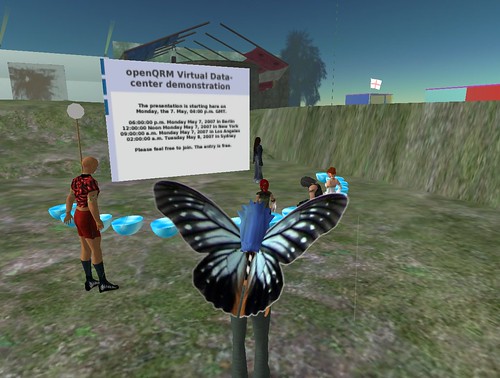
Actually his talk remembers me to my "Data-center within Second Life" project which i was working on about a year ago. My idea that time was to rebuild a "real world" data-center infra-structure inside Second Life, connect it to an openQRM server and enable the administration of real servers from within Second Life.


Basically it is about using the 3D virtual reality of SL as a user-interface for real world objects and/or applications. It worked out pretty well and i even gave a presentation including a live-demonstration within Second Life.about this openQRM sub-project

Here some links to videos of this virtual presentations:
part 1
part 2
part 3

Please find some pictures from this event here.

...... mhmmmm, guess i was "too early" with my idea ;)

Tuesday, January 29, 2008

Pictures from Profoss.eu

Raphael put pictures from the Profoss.eu event online at Flickr.

Here myself giving the presentation about "Conform deployment of virtual and physical machines with openQRM and Xen"


Tuesday, January 8, 2008

Interview about openQRM presentation at Profoss.eu


Please find an interview about the topics of the upcoming openQRM presenation

"Conform deployment of virtual and physical machines with openQRM and Xen"

taking place at Profoss.eu in Bruessels on the 22. and 23. january here.

Here some more infos about this upcoming event :

The european virtualisation conference organised by Profoss (http://profoss.eu) will take place on 22 and 23 january in Brussels, featuring non-commercial, informative talks by specialists in their fields (CEOs, analysts, technology specialists, developers, ..). The first day will focus on business and management aspects, the second day on technical aspects. Most of the important players of the market will be present. With the multiple discussion and coffee breaks, you should have time to meet and discuss with speakers, sponsors and attendants.

The schedule is available at http://www.profoss.eu/events/january-2008-virtualisation/?tab=activities
and the speakers' profiles are published at http://www.profoss.eu/events/january-2008-virtualisation/?tab=speakers

Many thanks to Raphael Bauduin for organizing this Event !

Hope to see you all there !


add to Del.icio.us


submit to Furl


Saturday, January 5, 2008

CIOs and IT Managers: Are you willing to adopt virtualization now?

Tarry pointed out an interesting question on Linkedin :

CIOs and IT Managers: Are you willing to adopt virtualization now?

I fully agree with him about the challenge to adopt to virtualization today. It adds another layer of complexity to the IT infra structure which current tools are not ready to manage in a flexible and transparent way for the system-administrators.

Nowadays a common data-center is normally still very static, powered by lots of physical systems with a custom installation, configured and maintained by a couple of loosely connected tools.

Virtualization claims to provide the option to move to an appliance-based deployment via virtual machines to ease-up deployment and to better use the resources of the data-center. Since bringing up a virtual machine more or less just requires space on a storage for the virtual-disk the need for high-end NAS and SAN data-storage systems raises.

On the other hand virtualization adds another level of complexity.
Systems and services migrated to virtual
machines still needs to be setup, monitored and maintained just in the same way as for physical servers.
With a raising number of servers (physical and virtual) it gets more hard to fulfill this task in a successful and efficient way.

Migration itself (e.g. from physical systems to virtual machines) can be a really tricky thing too since most virtualization technologies are still lacking this feature.

Another difficult task for the IT-department is to decide which of the current available virtualization technologies to use.

There comes the question if it is not a disadvantage to be limited to a single virtualization technology ?

To my mind it is because of two reasons :

1) Different virtualization technologies are available today.
There is "full-virtualization" (e.g. Qemu/KVM), "para-virtualization" (e.g. Xen) and "light-virtualization" which is in most cases based on a process-isolation (e.g. Linux-VServer, Solaris Zones).
Each technology has its advantages but also its "limitations".
Now, in a common data-center we normally find lots of different
applications with custom needs e.g. a web hosting company may have hundreds of "idle" customer web-servers plus a couple of in-house oracle data-base servers.
For the web-servers it would make the most sense to choose one of the "light-virtualization" or "para-virtualization" technologies to limit the virtualization overhead to a minimum.
Using "light- or para-virtualization" a single, physical machine can easily host several hundreds virtual partitions.
(please see "Building a virtualized web-farm with openQRM")

On the other hand the data-base servers are CPU, IO and network intensive so choosing one of the "full-virtualization" technologies would be a benefit.
So one reason that it is a disadvantage for the IT-department to limit themselves to a single virtualization technology is that the virtualization type should be selected according to the application needs.

2) The other reason is to simply avoid vendor-locking.

So if it would be best to choose the virtualization technology according the applications and services the IT infra-structure does not only need to support several different virtualization options but also provide an option to move from one virtualization type to another and also the possibility to migrate a virtual machine back to a physical system.

Today, if you try to move a e.g. VMware-partition to Linux-VServer
or a Xen-partition back to a physical machine, sure there are eventually some custom utils, scripts and howtos available which will help but at all this will be an "adventure".

Both situations, the common static data-center using physical servers and the new virtual-appliance-based infra-structure are already quite tricky to manage on their own but with the move to virtualization the system-administrator today even needs to handle "mixed environments", both physical and virtual.

To my mind we would need a tool which seamlessly integrates with the different virtualization technologies and conforms resource-planning, deployment and management of physical systems and virtual machines. This tool should also integrate with modern storage-systems to take the full advantage of fast-cloning servers for rapid and automated provisioning. It should have an open- and plugg-able architecture so that custom third-party utilities can be integrated in an easy way to combine them into a single-management console for the whole IT infra-structure.

If you are interested in such a tool you may want to take a look at the openQRM project which is exactly providing this kind of framework.

Enjoy !


add to Del.icio.us


submit to Furl